③ REQUIREMENTS TO SOLUTIONS
Three capabilities that rebuilt the admin workflow
My Role
I led this project as Product Manager, partnering with a brand new contract designer who was unfamiliar with the Motus product and users. I owned:
Gathering client feedback and validating concepts
Defining the automation rules and exception logic
Prioritizing features and writing user stories
Coordinating with Engineering through delivery and QA
The screens here are my own redesign, applying our current design system to those same core product decisions. I'm including this case study to show I can think beyond mobile consumer, specifically around dense data tables, permission systems, and UI where clarity matters more than delight.
CAPABILITY 01
Dashboard-Level Alerts
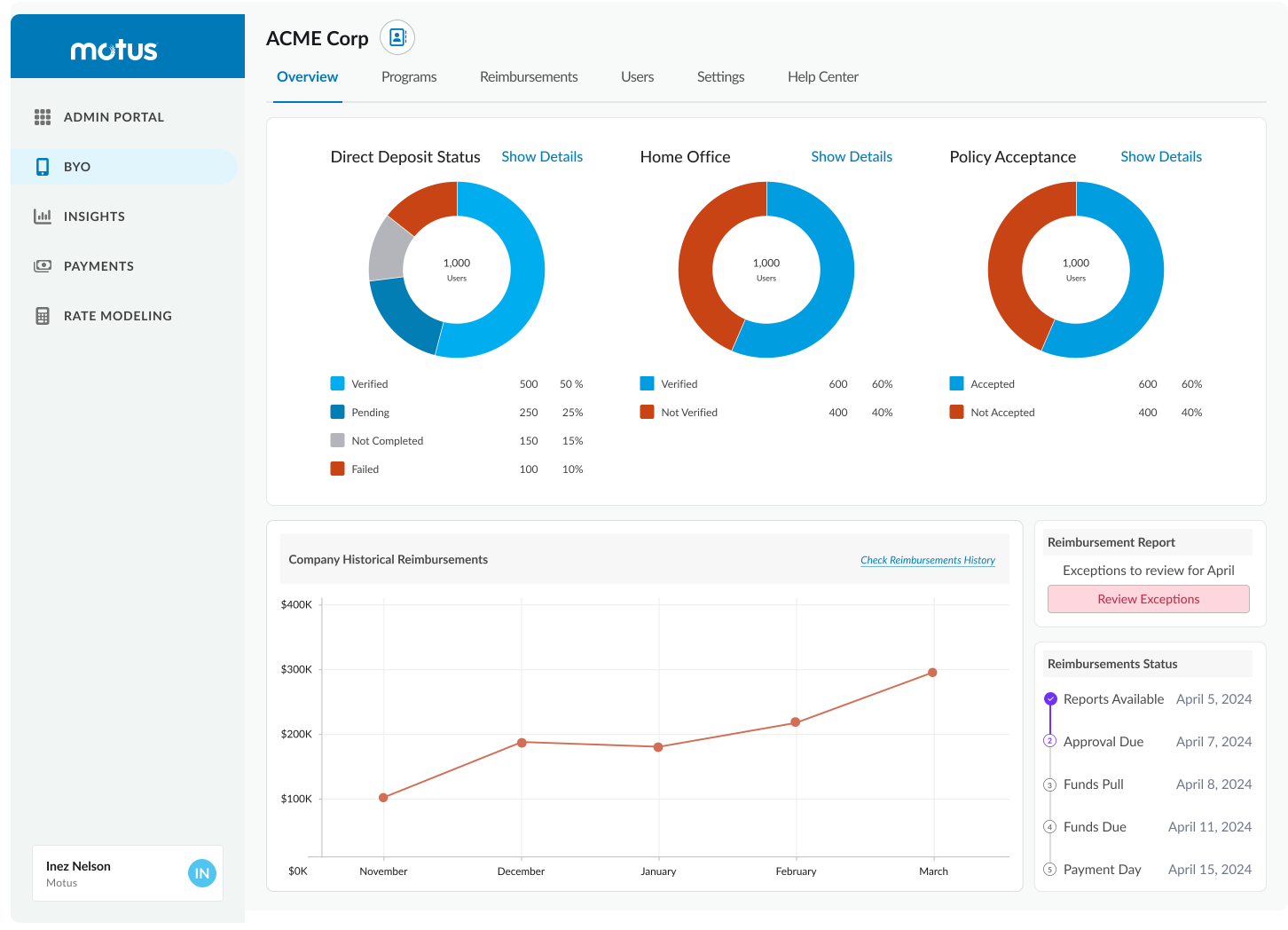
Admins now saw a summary banner on the dashboard notifying them of pending exceptions. This reduced the need to click into each report and helped prioritize their attention.
The dashboard notification gives admins immediate signal at the start of the pay period. Rather than navigating into the report blindly, they land with full context: how many total claims exist, how many were auto-approved, and exactly what exception types demand action. The breakdown in the alert prevents surprise.
CAPABILITY 02
Customizable Approval Settings
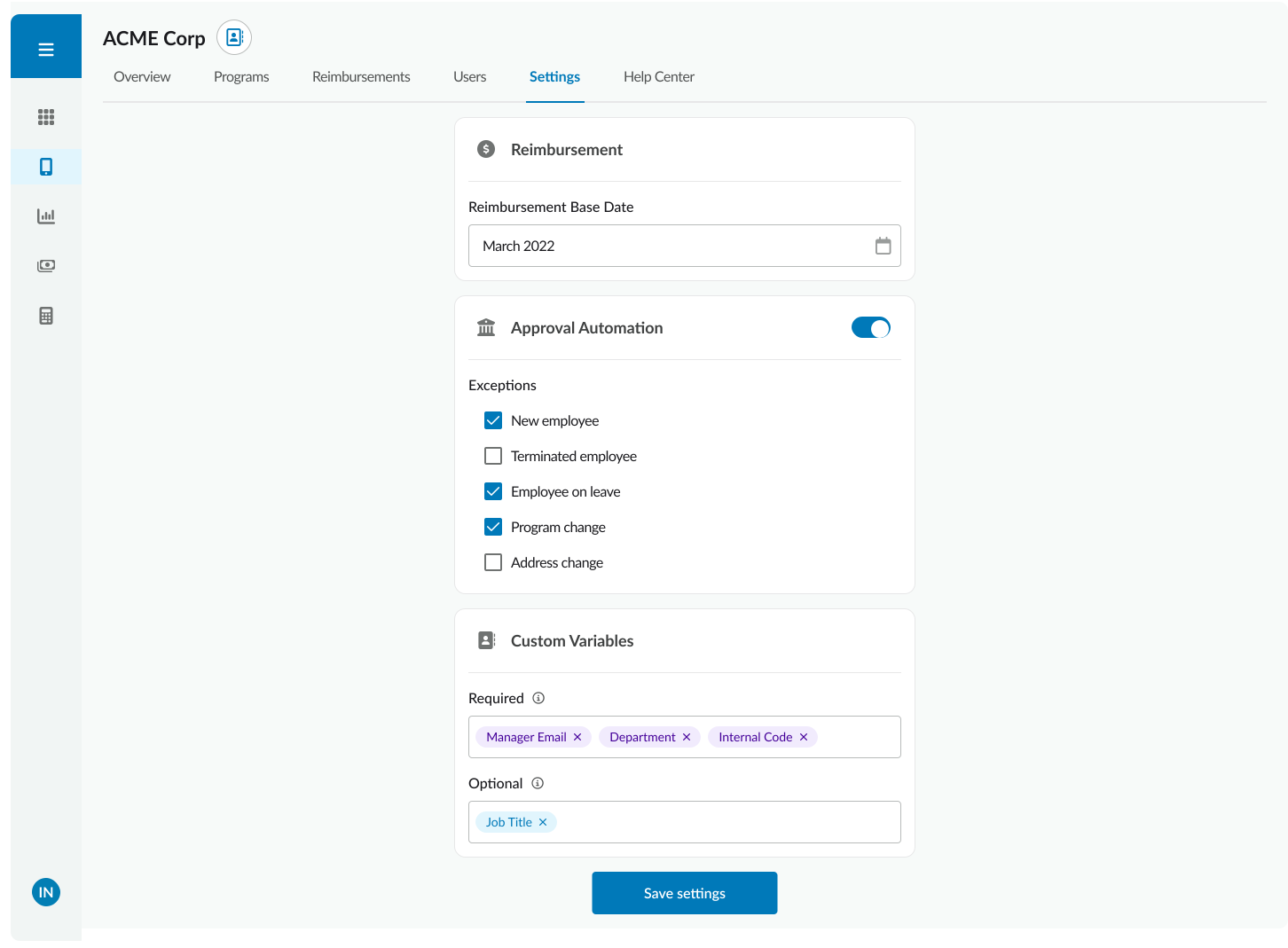
We introduced a flexible settings page allowing each company to select which exception types they wanted flagged. This ensured the system could adapt to varying internal policies and workflows.
The settings surface gives enterprise admins meaningful control without overwhelming them. Each exception type is a binary toggle with a plain-language description. Companies that don't care about rate change flags can turn them off. The system adapts to their risk tolerance, not the other way around.
CAPABILITY 03
Inline Reimbursement Report Enhancements
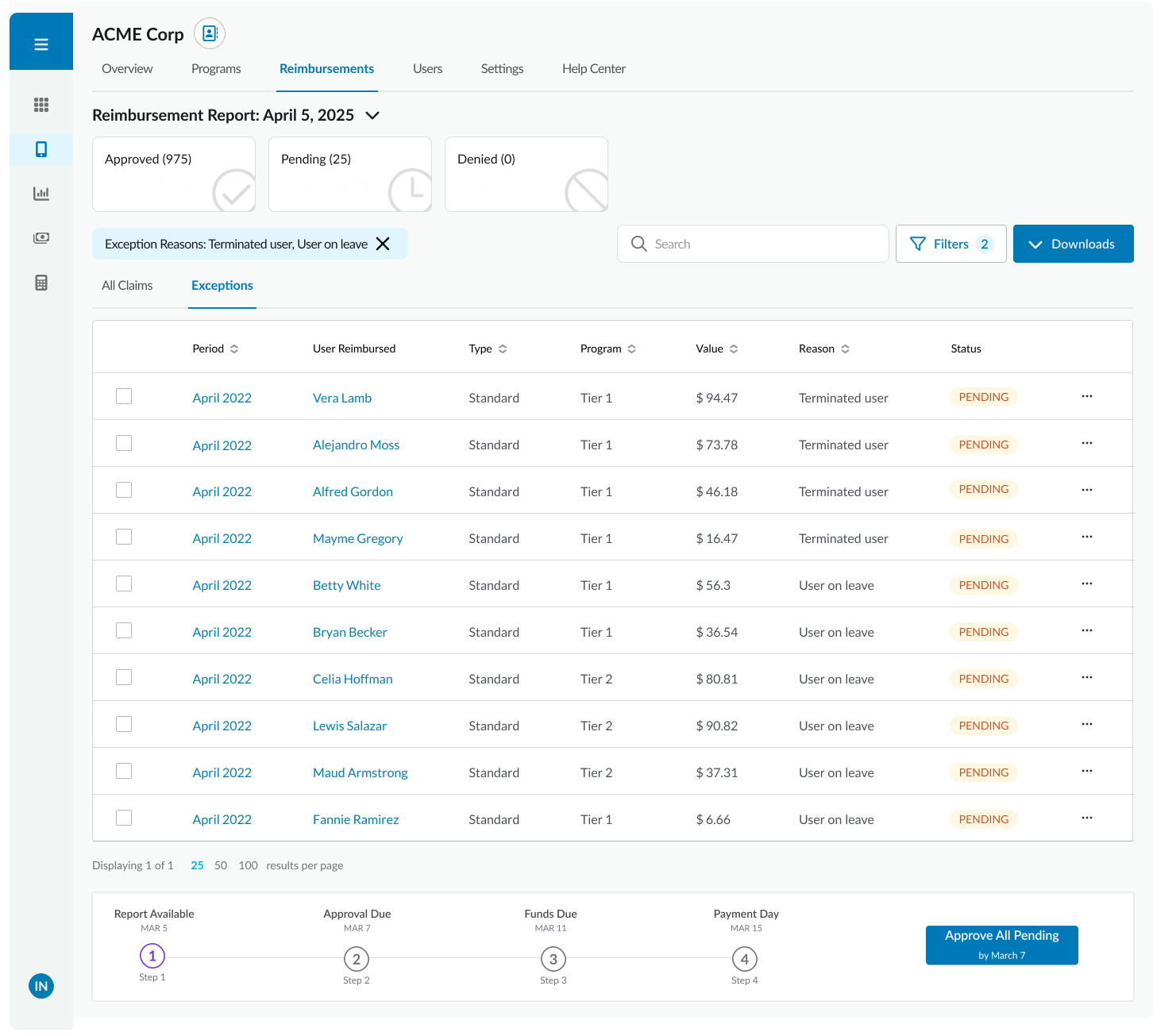
To reduce cognitive load, flagged claims were surfaced directly within the reimbursement report, keeping admins in context and minimizing navigation friction. Rather than reviewing all claims, the system automatically flagged only those with specific exceptions. We encoded five exception types that aligned with client expectations and compliance needs, ensuring only high-risk claims were reviewed.
The enhanced report keeps admins in their primary workflow. Flagged claims float to the top when the exceptions filter is active. Inline approve/deny actions eliminate the need to navigate to a separate review screen. Auto-approved rows are visible but visually de-emphasized, preserving context without creating noise.
The dashboard notification gives admins immediate signal at the start of the pay period. Rather than navigating into the report blindly, they land with full context: how many total claims exist, how many were auto-approved, and exactly what exception types demand action. The breakdown in the alert prevents surprise.
Key Capabilities
01. Dashboard-Level Alerts: Admins now saw a summary banner on the dashboard notifying them of pending exceptions. This reduced the need to click into each report and helped prioritize their attention.
The settings surface gives enterprise admins meaningful control without overwhelming them. Each exception type is a binary toggle with a plain-language description. Companies that don't care about rate change flags can turn them off. The system adapts to their risk tolerance, not the other way around.
02. Customizable Approval Settings: We introduced a flexible settings page allowing each company to select which exception types they wanted flagged. This ensured the system could adapt to varying internal policies and workflows.
03. Inline Reimbursement Report Enhancements: To reduce cognitive load, flagged claims were surfaced directly within the reimbursement report, keeping admins in context and minimizing navigation friction. Rather than reviewing all claims, the system automatically flagged only those with specific exceptions. We encoded five exception types that aligned with client expectations and compliance needs, ensuring only high-risk claims were reviewed.
The enhanced report keeps admins in their primary workflow. Flagged claims float to the top when the exceptions filter is active. Inline approve/deny actions eliminate the need to navigate to a separate review screen. Auto-approved rows are visible but visually de-emphasized, preserving context without creating noise.
MY ROLE
I led this project as the Product Manager
I partnered with a brand new contract designer who was unfamiliar with the Motus product and users. I owned:
Gathering client feedback and validating concepts
Defining the automation rules and exception logic
Prioritizing features and writing user stories
Coordinating with Engineering through delivery and QA
The screens here are my own redesign, applying our current design system to those same core product decisions. I'm including this case study to show I can think beyond mobile consumer, specifically around dense data tables, permission systems, and UI where clarity matters more than delight.
CAPABILITY 01
Dashboard-Level Alerts
Admins now saw a summary banner on the dashboard notifying them of pending exceptions. This reduced the need to click into each report and helped prioritize their attention.
The dashboard notification gives admins immediate signal at the start of the pay period. Rather than navigating into the report blindly, they land with full context: how many total claims exist, how many were auto-approved, and exactly what exception types demand action. The breakdown in the alert prevents surprise.
CAPABILITY 02
Customizable Approval Settings
We introduced a flexible settings page allowing each company to select which exception types they wanted flagged. This ensured the system could adapt to varying internal policies and workflows.
The settings surface gives enterprise admins meaningful control without overwhelming them. They can select which reasons are most relevant to their company policies. Companies that don't care about rate change flags can turn them off. The system adapts to their risk tolerance, not the other way around.
CAPABILITY 03
Inline Reimbursement Report Enhancements
To reduce cognitive load, flagged claims were surfaced directly within the reimbursement report, keeping admins in context and minimizing navigation friction. Rather than reviewing all claims, the system automatically flagged only those with specific exceptions. We encoded five exception types that aligned with client expectations and compliance needs, ensuring only high-risk claims were reviewed.
The enhanced report keeps admins in their primary workflow. Flagged claims can be viewed in a dedicated tab, and filters give the admin precision when approving their monthly report.
My Role
As the Product Manager, I led discovery, strategy, and delivery—partnering with Engineering, Customer Success, and a contract UI designer to bring this feature to life. I owned:
Defining the automation rules and exception logic
Gathering client feedback and validating concepts
Prioritizing features and writing user stories
Coordinating with Engineering through delivery and QA
Later, during my time as a Product Designer, I helped implement our internal design system and updated the visual layer of BYO features—bringing cohesion and consistency to the experience.